Is 8GB RAM Enough on the MacBook Neo? What You Can (and Can’t) Do
The MacBook Neo comes with 8GB of RAM and you cannot change that. Here is what that actually means for your daily life, in plain English, without the tech jargon.
YA
Yann A.··
Updated April 12, 2026
5 min read
TL;DR
For most people, yes. Browsing, Netflix, emails, documents, video calls, light photo editing, social media, all fine. Where it starts to feel tight: video editing longer than a few minutes, running many heavy apps at once, or keeping 30+ browser tabs open constantly. The 8GB on the MacBook Neo also works differently from 8GB on a Windows laptop, and that difference matters. Keep reading.
What Is RAM and Why It Affects Performance
RAM stands for Random Access Memory. Think of it like your desk. Your computer uses it to keep everything you are currently working on within reach. Your browser tabs, open apps, the music playing in the background, all of that sits in RAM while you are using it.
When your desk gets full, you have two options: put something away to make space, or pile things on top of each other and work more slowly. Your computer does the same thing. When RAM fills up, your Mac starts moving things temporarily to the SSD (the storage drive) to free up space. This is called swap. It works, but it is slower than keeping everything in RAM.
More RAM means a bigger desk. A bigger desk means you can have more things open at once without the computer needing to shuffle things around. That is the whole story.
💬
Editor's take
The 8GB on the MacBook Neo is locked. Unlike most laptops where you can add more RAM later, the MacBook Neo’s memory is soldered directly onto the chip. What you buy is what you have for the life of the computer. There is no upgrade path.
Easy RAM Calculator Based on What You Do
Question 1 of 3
What do you mainly use your computer for?
Pick the one that fits best — you can always be more specific next.
Question 2 of 3
How many tabs do you usually have open?
Be honest. We have all been there.
Question 2 of 3
What does a typical work session look like?
Question 2 of 3
What kind of games?
Question 3 of 3
Do you keep other things open while gaming?
Discord, browser, Spotify — that kind of thing.
Question 2 of 3
What kind of creative work?
Question 3 of 3
What resolution are you editing in?
Check your camera specs or the project settings in your editing software if unsure.
Question 3 of 3
How complex are your projects?
Question 2 of 3
Do you game at all, even occasionally?
Your answer
8 GB
is what you need
You are doing light, everyday stuff. Browsing, streaming, maybe some social media. 8GB handles all of that without breaking a sweat. You do not need more — save your money for something else.
💡 If you are buying a new laptop, still consider 16GB if it is a cheap upgrade. It adds a couple of years to how long the machine feels fast.
Forty tabs is not browsing. That is basically running a server. Each browser tab uses memory, and at that count you will feel 8GB choking within a year. 16GB keeps everything smooth no matter how chaotic your browser gets.
💡 Chrome and Edge are especially memory-hungry. If you ever switched to Safari or Firefox to "make it faster," more RAM is the real fix.
Light work tasks do not need much. Email, a document, a Zoom call — 8GB covers all of that comfortably. You will not notice any slowdowns in normal use.
💡 Buying new? Go 16GB if the price difference is small. It is cheap insurance for when your workload grows.
Running Zoom, a browser with several tabs, and Office at the same time pushes 8GB to its limit fast. 16GB is the right call for your workload — everything stays responsive when you switch between apps, no lag when sharing your screen on calls.
💡 If your computer slows down during Zoom calls specifically, that is almost always a RAM issue. 16GB fixes it.
Minecraft and most indie games run fine on 8GB. But game requirements are creeping up every year — even Minecraft has gotten heavier with mods and shader packs. If you are buying new hardware today, 16GB is worth the extra $20 to $30 for the headroom.
💡 Already have 8GB? No need to upgrade for casual gaming. But if you are building or buying new, do not settle for 8GB if you can help it.
Modern games like Fortnite and GTA VI are built for 16GB. You will get better frame rates, fewer stutters, and faster load times compared to 8GB. With Discord and Spotify running in the background, 8GB is already stretched thin — 16GB gives you breathing room.
💡 Going 32GB for gaming alone is not necessary unless you also do something creative or stream. 16GB hits the sweet spot right now.
Streaming while gaming is one of the most demanding things you can do on a PC. The game itself, OBS or Streamlabs, your browser, Discord — they all run simultaneously. 16GB will stutter. 32GB keeps everything running clean so your stream does not drop frames mid-match.
💡 If you are serious about streaming quality, also make sure your CPU is strong enough — RAM is not the only bottleneck here.
If you are running modern games plus a browser plus other apps all at once, 16GB will hit its ceiling on demanding titles. 32GB gives you full freedom — game, alt-tab, look something up, come back — with zero performance hit.
💡 32GB is increasingly becoming the new 16GB for heavy PC users. You will not regret it.
Lightroom and Photoshop are hungry apps, but 16GB handles photo editing very well for most photographers. You can edit, export, and run your browser in the background without slowdowns. If you work with large RAW files from a high-megapixel camera (50MP+), consider 32GB.
💡 Lightroom gets noticeably faster with more RAM when building previews. If your catalog is large, 32GB is a quality-of-life upgrade worth considering.
Figma, Illustrator, and most design tools are well-optimised and do not eat RAM the way video or 3D software does. 16GB gives you plenty of headroom for large files, lots of artboards, and keeping your browser open with references.
💡 If you also do any 3D work or motion graphics in addition to design, bump up to 32GB.
1080p video editing is well within 16GB territory. Premiere and DaVinci Resolve both run well at this resolution with that amount of RAM. Your timeline will be smooth and exports will not bottleneck on memory.
💡 If your editing software feels slow at 16GB, the culprit is more likely your storage speed (use an SSD, not an HDD) or your GPU — not RAM.
4K footage is large and editing software needs to buffer multiple frames at once to keep your timeline smooth. 16GB will work but you will feel it — dropped frames in the preview, slow scrubbing, stuttery playback. 32GB makes 4K editing actually enjoyable.
💡 DaVinci Resolve especially benefits from more RAM. If you use it, 32GB is close to mandatory for a good experience at 4K.
6K, 8K, and heavy compositing work in After Effects will eat through 32GB on complex timelines. 64GB gives your software the full buffer it needs to handle large frames and multiple effect layers without choking. At this level of work, RAM is a genuine production tool, not a luxury.
💡 If you are doing this professionally, also invest in fast NVMe storage and a dedicated GPU. RAM alone is not the whole picture.
Small to medium sessions in Ableton, Logic, or FL Studio run well on 16GB. You can load a decent number of plugins and virtual instruments without running into memory issues. This is the sweet spot for bedroom producers.
💡 Sample libraries (especially orchestral ones) are loaded into RAM when you play them. If you use a lot of Spitfire or Kontakt libraries, you may grow out of 16GB faster than expected.
Orchestral templates and projects with lots of VST instruments load large sample libraries directly into RAM. At that scale, 16GB runs out quickly and your DAW starts freezing or throwing low-memory warnings. 32GB gives you the headroom to keep your full template loaded and stay in flow.
💡 Some composers working with very large orchestral libraries (Berlin, Spitfire BBCSO full) use 64GB. If your sessions are truly massive, plan for that ceiling.
When you combine work, browsing, creative tasks, and gaming, each one reasonable on its own, you end up with a workload that stretches 16GB. 32GB means you never have to think about closing apps before switching what you are doing.
💡 32GB is also increasingly the standard recommendation for new builds in 2026. You are future-proofing yourself for the next 4 to 5 years.
A bit of everything without gaming lands comfortably in 16GB territory. Work apps, browser, some light creative tools — 16GB keeps all of it running smoothly without overpaying for RAM you will not use.
💡 If you ever get into video editing or music production more seriously, 32GB is your next step. But 16GB is the right place to start.
Yes, and this is the most important thing to understand before you write off the MacBook Neo’s specs.
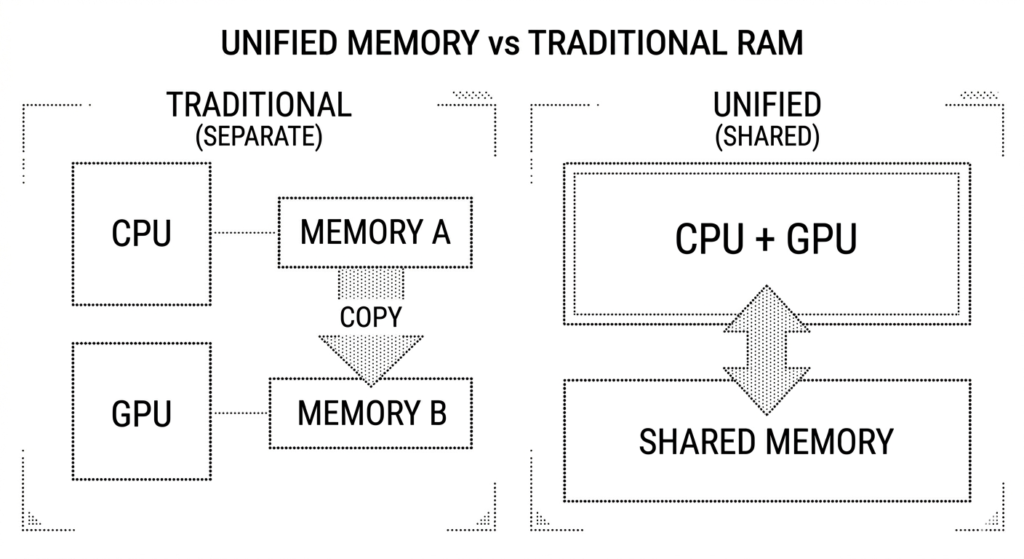
On a typical Windows laptop, the CPU (the brain), the GPU (handles graphics), and the RAM are three separate components. They have to constantly send data back and forth between each other. That communication takes time and uses memory. On the MacBook Neo, all three share the same pool of memory. Apple calls this Unified Memory Architecture.
In practical terms: a Windows laptop with 8GB has to divide that memory between its CPU and its graphics. A MacBook Neo with 8GB uses all of it wherever it is needed at any given moment. The result is that the MacBook Neo’s 8GB goes further than 8GB on a comparable Windows machine.
MacRumors tested the MacBook Neo with 60 Chrome tabs open simultaneously alongside Mail, Messages, and Spotify running in the background. Everything remained usable with no freezing. Their conclusion was direct: a Windows laptop probably could not operate the same way on just 8GB. Apple’s architecture makes the same number stretch further.
That does not make 8GB unlimited. It just means the comparison with Windows laptops is not apples to apples.
Does the A18 Pro Chip Make 8GB RAM Better on MacBook Neo?
The MacBook Neo uses the A18 Pro, which is the same chip Apple put inside the iPhone 16 Pro. This is the first time Apple has used a phone chip inside a Mac, and it raises a fair question: is a phone chip powerful enough for a laptop?
Key specs at a glance
Chip
A18 Pro
Same chip as iPhone 16 Pro, built on 3nm
CPU cores
6 cores
2 performance, 4 efficiency
GPU cores
5 cores
Hardware ray tracing included
Neural Engine
16 cores
Runs all Apple Intelligence features on-device
Unified Memory
8GB
Shared between CPU, GPU, and Neural Engine
Cooling
Fanless
Aluminum chassis acts as heatsink
The chip itself is genuinely fast for everyday tasks. Single-core performance, which is what drives how snappy apps open and how responsive the interface feels, beats the older M1 MacBook Air. For anything you are doing one task at a time, the A18 Pro is more than capable.
Where it differs from the M-series chips in other Macs is sustained heavy workloads. The A18 Pro was designed for a phone, where tasks happen in short bursts. In a laptop it runs continuously, and without a fan the aluminum chassis has to manage all the heat passively. Apple designed this well, and the laptop handles normal use without throttling. But under sustained extreme load like exporting a long video, it will be slower than an M4 MacBook Air running the same task.
There is also one hard limitation worth knowing: Adobe Premiere Pro does not support the A18 Pro chip. If Premiere is part of your workflow, the MacBook Neo is not the right machine regardless of RAM.
💬
Editor's take
The phone chip in a laptop question is more interesting than it sounds. In practice the A18 Pro is fast enough that most people will never feel the ceiling. The issue is not the chip itself, it is the combination of 8GB RAM that cannot be upgraded and a handful of apps that do not support it yet. If your workflow fits within those walls, you will be happy. If it does not, no amount of chip speed compensates.
What You Can Do with 8GB RAM on the MacBook Neo (Daily Tasks & Work)
Here is the realistic picture, based on actual testing and reviews, not marketing claims.
Browsing the web, even with a lot of tabs
20 to 30 tabs in Chrome or Safari with YouTube, Google Docs, and news sites open simultaneously works fine. At 60 tabs you are pushing the limits but it remains usable. Most people never hit 60 tabs.
Emails, documents, and spreadsheets
Microsoft Word, Google Docs, Excel, Pages, Numbers. All perfectly comfortable. This is what the MacBook Neo was designed for and it handles it without any effort.
Video calls (Zoom, FaceTime, Google Meet)
Works well. The 1080p front camera is solid for calls, and running a video call alongside a browser and notes app is no problem. This is a common student and remote worker use case and the Neo handles it comfortably.
Netflix, YouTube, streaming, music
The A18 Pro has a dedicated media engine for video decoding. Streaming 4K video is smooth and efficient on battery. This is one area where the chip genuinely excels.
Light photo editing
Editing photos in Photos, Lightroom, or Affinity Photo works well. Applying filters, cropping, adjusting exposure, organising libraries. You will not feel the RAM limit here in normal use.
Apple Intelligence features
Writing Tools, Clean Up, Genmoji, Priority Messages, all the AI features in macOS Tahoe run fully on-device. The 16-core Neural Engine handles this locally, which is one of the reasons Apple put the A18 Pro in the Neo rather than a cheaper chip.
Short video editing for social media
Editing a 2 to 3 minute video in iMovie or CapCut for Instagram or TikTok is fine. Export times will be longer than an M4 Mac, but the process itself does not feel painful for short clips.
Coding (web development, scripting)
VS Code, terminal work, running local web servers, writing Python or JavaScript — all comfortable. Where it gets tighter is running multiple Docker containers or compiling large projects simultaneously.
What 8GB RAM Can’t Handle Well (Limits & Slowdowns)
Long video editing (10+ minutes of footage)
Editing a 15-minute YouTube video in Final Cut Pro or DaVinci Resolve will work but export times are noticeably slow compared to an M4 Mac. Timeline scrubbing on long 4K projects can feel sluggish. iMovie for short clips is fine. Serious video editors should step up to the MacBook Air.
Adobe Premiere Pro
Premiere Pro does not support the A18 Pro chip. This is a hard incompatibility, not a performance issue. It simply will not run. If Premiere is part of your workflow, the MacBook Neo is not the right machine.
Running many heavy apps at the same time
If you regularly have Photoshop, Zoom, Slack, a browser with 20 tabs, and Spotify all running simultaneously, you will feel memory pressure. Each of those apps wants RAM. When they compete for the same 8GB, things slow down. The Mac handles it gracefully compared to Windows, but it is noticeable.
3D design, motion graphics, and heavy creative work
Blender, Cinema 4D, After Effects — these tools want as much RAM as they can get. The MacBook Neo will run them, slowly, for simple projects. For anything production-level, this is not the right machine.
Gaming
The MacBook Neo can run some Mac-native games and lighter titles reasonably well. But demanding games, or games not optimised for the A18 Pro, will struggle. The GPU shares that 8GB with everything else. For gaming, look at a dedicated Windows gaming laptop or wait for the MacBook Air M4, which handles games better.
Xcode and large app compilation
iOS or macOS developers who compile large projects regularly will find the 8GB ceiling limiting. Compilation times are longer and running a simulator alongside Xcode puts real pressure on memory. Most hobbyist developers and students will be okay. Professional iOS developers should look at a MacBook Pro.
Who Should Buy 8GB RAM (and Who Shouldn’t)
Buy the MacBook Neo if you…
+
✓ Are a student doing coursework, research, and writing
+
✓ Work mainly in a browser, email, and office apps
+
✓ Want to try macOS for the first time at a low entry price
+
✓ Need all-day battery life without carrying a charger
+
✓ Edit short videos for social media occasionally
+
✓ Do light photo work in Lightroom or Apple Photos
Look elsewhere if you…
−
✗ Edit videos longer than a few minutes regularly
−
✗ Use Adobe Premiere Pro (not supported)
−
✗ Run heavy creative apps like Blender or After Effects
−
✗ Are a developer who compiles large projects daily
−
✗ Play demanding games and expect decent performance
−
✗ Need to use the laptop for 5+ years at full workload
Will 8GB feel old in a few years?
Honestly, yes, eventually. Software tends to use more memory over time, not less. A machine that handles today’s workloads comfortably can feel tight in three or four years as apps grow heavier and browser engines consume more.
The counterargument is that Apple’s efficiency improvements keep closing the gap. macOS Tahoe’s memory management is genuinely better than Windows at the same spec. And for the use cases the MacBook Neo targets — students, everyday users, first-time Mac buyers — the workloads do not typically scale aggressively.
If you plan to keep this laptop for two to three years doing the tasks described in the “can do” section, you will be fine. If you want a machine that feels fast for five or six years of growing workloads, spend the extra $500 on the MacBook Air M4 with 16GB. The Air starts at $1,099, includes 16GB RAM, a better display, MagSafe charging, and a chip built specifically for Mac. The Neo is not a compromise on the Air. It is a different product for a different buyer.
💡
Students: check if your school offers education pricing. The MacBook Neo drops to $499 with Apple’s education discount. At that price, the 8GB question becomes even easier to answer for most student use cases.
Final Verdict: Is 8GB RAM Enough?
The MacBook Neo’s 8GB is not the same as 8GB on a cheap Windows laptop. Unified memory architecture, macOS efficiency, and the A18 Pro’s smart memory management mean it handles everyday tasks better than the spec sheet suggests. For students, casual users, and anyone whose daily work lives in a browser and office apps, 8GB will not be a problem. For video editors, heavy creative professionals, or anyone thinking about Premiere Pro, it is the wrong machine regardless of the RAM number. Know which category you are in before you buy.